
AWS (S3, CloudFront, ALB) (old)
Learn how to implementate TollBit with Amazon S3, ALB, and/or CloudFront.
Steps for Analytics
Forwarding Logs with ALB
To forward logs from an ALB, follow these steps outlined in the AWS docs.
Once you have started forwarding your logs to an S3 bucket, create an IAM policy to allow TollBit to access your logs: If your logs are already being sent to an S3 bucket, add the following IAM policy to your bucket to enable TollBit to process your logs:
{
  "Version": "2012-10-17",
  "Statement": [
    {
      "Sid": "AllowTollbitAccountsAccess",
      "Effect": "Allow",
      "Principal": {
        "AWS": [
          "arn:aws:iam::339712821696:root",
          "arn:aws:iam::654654318267:root"
        ]
      },
      "Action": ["s3:GetObject*", "s3:ListBucket*"],
      "Resource": [
        "arn:aws:s3:::YOUR-BUCKET-NAME",
        "arn:aws:s3:::YOUR-BUCKET-NAME/*"
      ]
    }
  ]
}
Once you have created the policy, reach out to [email protected] to coordinate with our engineering team on the rest of the TollBit Analytics setup.
To finalize your setup, we will need access to the directory in your S3 bucket where your logs are stored, along with the pattern for how the logs are stored for instance /service/logs/2024/12/04/log-file
Pro TipIf your bucket has ACLs, follow the instructions here.
Forwarding Logs with Cloudfront
To forward logs from Cloudfront follow these steps:
Enable standard logging for your Cloudfront distribution following the AWS docs.
Point your logs at an S3 Bucket. Note, we only currently support the default w3c, tab delimited format with the default 33 fields that are included in the logs. If you wish to use JSON and/or modify the fields that Cloudfront logs, please reach out to [email protected] and we can get that set up for you.
Create the following IAM policy for your bucket to allow TollBit to process your logs: If your logs are already being sent to an S3 bucket, add the following IAM policy to your bucket to enable TollBit to process your logs:
{
  "Version": "2012-10-17",
  "Statement": [
    {
      "Sid": "AllowTollbitAccountsAccess",
      "Effect": "Allow",
      "Principal": {
        "AWS": [
          "arn:aws:iam::339712821696:root",
          "arn:aws:iam::654654318267:root"
        ]
      },
      "Action": ["s3:GetObject*", "s3:ListBucket*"],
      "Resource": [
        "arn:aws:s3:::YOUR-BUCKET-NAME",
        "arn:aws:s3:::YOUR-BUCKET-NAME/*"
      ]
    }
  ]
}
Once you have started forwarding your logs to an S3 bucket, and granted TollBit access, reach out to [email protected] to coordinate with our engineering team on the rest of the TollBit Analytics setup. To finalize your setup, we will need access to the directory in your S3 bucket where your logs are stored, along with the pattern for how the logs are stored for instance /service/logs/2024/12/04/log-file
Pro TipIf your bucket has ACLs, follow the instructions here.
Steps for Agent Site
AWS WAF + CloudFront Route To Agent Site
You can use a combination of AWS Web ACLs and CloudFront to detect and redirect bots. This example will use a Web ACL with a WAF rule to detect bots, and then have CloudFront redirect bot traffic.
First, go to the WAF & Shield and create a new Web ACL. Ensure that the ACL being created is for CloudFront distributions. Add your existing CloudFront distribution to this ACL under the "Associated AWS resources" section of the page.
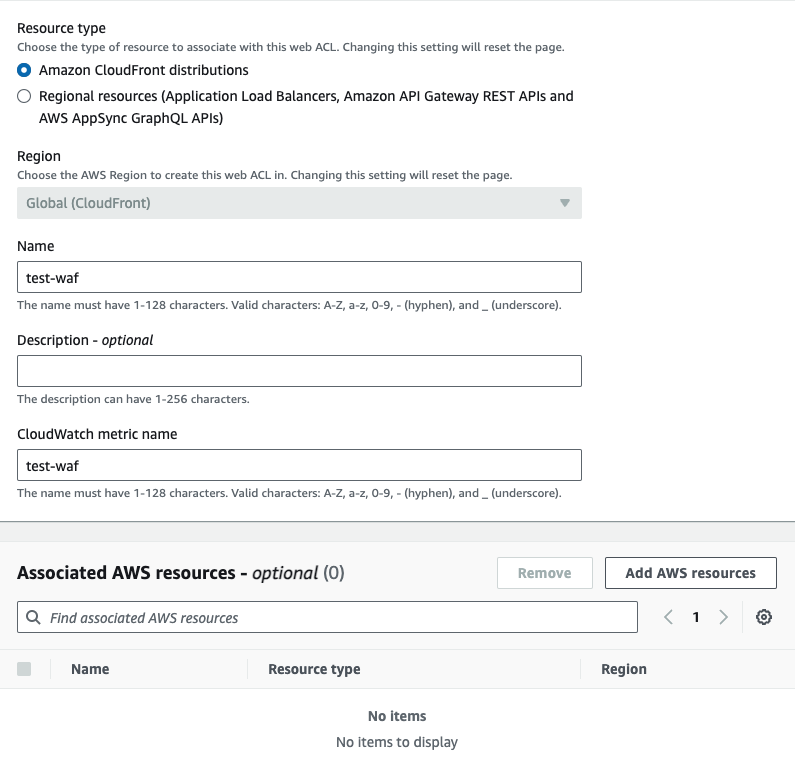
Once you've created the ACL, you can choose any rules you'd like to enable bot detection. AWS Marketplace has managed bot detection rules that you can add to your ACL. We will provide our own WAF rule as well. To use our WAF rule, select the option for using your own rules and rule groups, and use the JSON editor. Copy and paste the following rule:
{
  "Name": "cloudfront-agent-rule",
  "Priority": 0,
  "Statement": {
    "OrStatement": {
      "Statements": [
        {
          "ByteMatchStatement": {
            "SearchString": "chatgpt-user",
            "FieldToMatch": { "SingleHeader": { "Name": "user-agent" } },
            "TextTransformations": [{ "Priority": 0, "Type": "LOWERCASE" }],
            "PositionalConstraint": "CONTAINS"
          }
        },
        {
          "ByteMatchStatement": {
            "SearchString": "perplexitybot",
            "FieldToMatch": { "SingleHeader": { "Name": "user-agent" } },
            "TextTransformations": [{ "Priority": 0, "Type": "NONE" }],
            "PositionalConstraint": "CONTAINS"
          }
        },
        {
          "ByteMatchStatement": {
            "SearchString": "gptbot",
            "FieldToMatch": { "SingleHeader": { "Name": "user-agent" } },
            "TextTransformations": [{ "Priority": 0, "Type": "LOWERCASE" }],
            "PositionalConstraint": "CONTAINS"
          }
        },
        {
          "ByteMatchStatement": {
            "SearchString": "anthropic-ai",
            "FieldToMatch": { "SingleHeader": { "Name": "user-agent" } },
            "TextTransformations": [{ "Priority": 0, "Type": "LOWERCASE" }],
            "PositionalConstraint": "CONTAINS"
          }
        },
        {
          "ByteMatchStatement": {
            "SearchString": "ccbot",
            "FieldToMatch": { "SingleHeader": { "Name": "user-agent" } },
            "TextTransformations": [{ "Priority": 0, "Type": "LOWERCASE" }],
            "PositionalConstraint": "CONTAINS"
          }
        },
        {
          "ByteMatchStatement": {
            "SearchString": "amazonbot",
            "FieldToMatch": { "SingleHeader": { "Name": "user-agent" } },
            "TextTransformations": [{ "Priority": 0, "Type": "LOWERCASE" }],
            "PositionalConstraint": "CONTAINS"
          }
        },
        {
          "ByteMatchStatement": {
            "SearchString": "claude-web",
            "FieldToMatch": { "SingleHeader": { "Name": "user-agent" } },
            "TextTransformations": [{ "Priority": 0, "Type": "LOWERCASE" }],
            "PositionalConstraint": "CONTAINS"
          }
        },
        {
          "ByteMatchStatement": {
            "SearchString": "cohere-ai",
            "FieldToMatch": { "SingleHeader": { "Name": "user-agent" } },
            "TextTransformations": [{ "Priority": 0, "Type": "LOWERCASE" }],
            "PositionalConstraint": "CONTAINS"
          }
        },
        {
          "ByteMatchStatement": {
            "SearchString": "omgilibot",
            "FieldToMatch": { "SingleHeader": { "Name": "user-agent" } },
            "TextTransformations": [{ "Priority": 0, "Type": "LOWERCASE" }],
            "PositionalConstraint": "CONTAINS"
          }
        },
        {
          "ByteMatchStatement": {
            "SearchString": "omgili",
            "FieldToMatch": { "SingleHeader": { "Name": "user-agent" } },
            "TextTransformations": [{ "Priority": 0, "Type": "LOWERCASE" }],
            "PositionalConstraint": "CONTAINS"
          }
        },
        {
          "ByteMatchStatement": {
            "SearchString": "youbot",
            "FieldToMatch": { "SingleHeader": { "Name": "user-agent" } },
            "TextTransformations": [{ "Priority": 0, "Type": "LOWERCASE" }],
            "PositionalConstraint": "CONTAINS"
          }
        },
        {
          "ByteMatchStatement": {
            "SearchString": "bytespider",
            "FieldToMatch": { "SingleHeader": { "Name": "user-agent" } },
            "TextTransformations": [{ "Priority": 0, "Type": "LOWERCASE" }],
            "PositionalConstraint": "CONTAINS"
          }
        },
        {
          "ByteMatchStatement": {
            "SearchString": "diffbot",
            "FieldToMatch": { "SingleHeader": { "Name": "user-agent" } },
            "TextTransformations": [{ "Priority": 0, "Type": "LOWERCASE" }],
            "PositionalConstraint": "CONTAINS"
          }
        },
        {
          "ByteMatchStatement": {
            "SearchString": "oai-searchbot",
            "FieldToMatch": { "SingleHeader": { "Name": "user-agent" } },
            "TextTransformations": [{ "Priority": 0, "Type": "LOWERCASE" }],
            "PositionalConstraint": "CONTAINS"
          }
        },
        {
          "ByteMatchStatement": {
            "SearchString": "meta-externalagent",
            "FieldToMatch": { "SingleHeader": { "Name": "user-agent" } },
            "TextTransformations": [{ "Priority": 0, "Type": "LOWERCASE" }],
            "PositionalConstraint": "CONTAINS"
          }
        },
        {
          "ByteMatchStatement": {
            "SearchString": "timpibot",
            "FieldToMatch": { "SingleHeader": { "Name": "user-agent" } },
            "TextTransformations": [{ "Priority": 0, "Type": "LOWERCASE" }],
            "PositionalConstraint": "CONTAINS"
          }
        },
        {
          "ByteMatchStatement": {
            "SearchString": "perplexity-user",
            "FieldToMatch": { "SingleHeader": { "Name": "user-agent" } },
            "TextTransformations": [{ "Priority": 0, "Type": "LOWERCASE" }],
            "PositionalConstraint": "CONTAINS"
          }
        },
        {
          "ByteMatchStatement": {
            "SearchString": "claudebot",
            "FieldToMatch": { "SingleHeader": { "Name": "user-agent" } },
            "TextTransformations": [{ "Priority": 0, "Type": "LOWERCASE" }],
            "PositionalConstraint": "CONTAINS"
          }
        },
        {
          "ByteMatchStatement": {
            "SearchString": "google-notebooklm",
            "FieldToMatch": { "SingleHeader": { "Name": "user-agent" } },
            "TextTransformations": [{ "Priority": 0, "Type": "LOWERCASE" }],
            "PositionalConstraint": "CONTAINS"
          }
        },
        {
          "ByteMatchStatement": {
            "SearchString": "claude-user",
            "FieldToMatch": { "SingleHeader": { "Name": "user-agent" } },
            "TextTransformations": [{ "Priority": 0, "Type": "LOWERCASE" }],
            "PositionalConstraint": "CONTAINS"
          }
        },
        {
          "ByteMatchStatement": {
            "SearchString": "duckassistbot",
            "FieldToMatch": { "SingleHeader": { "Name": "user-agent" } },
            "TextTransformations": [{ "Priority": 0, "Type": "LOWERCASE" }],
            "PositionalConstraint": "CONTAINS"
          }
        },
        {
          "ByteMatchStatement": {
            "SearchString": "mistralai-user",
            "FieldToMatch": { "SingleHeader": { "Name": "user-agent" } },
            "TextTransformations": [{ "Priority": 0, "Type": "LOWERCASE" }],
            "PositionalConstraint": "CONTAINS"
          }
        }
      ]
    }
  },
  "Action": {
    "Allow": {
      "CustomRequestHandling": {
        "InsertHeaders": [
          {
            "Name": "Bot",
            "Value": "true"
          }
        ]
      }
    }
  },
  "VisibilityConfig": {
    "SampledRequestsEnabled": true,
    "CloudWatchMetricsEnabled": true,
    "MetricName": "cloudfront-agent-rule"
  }
}
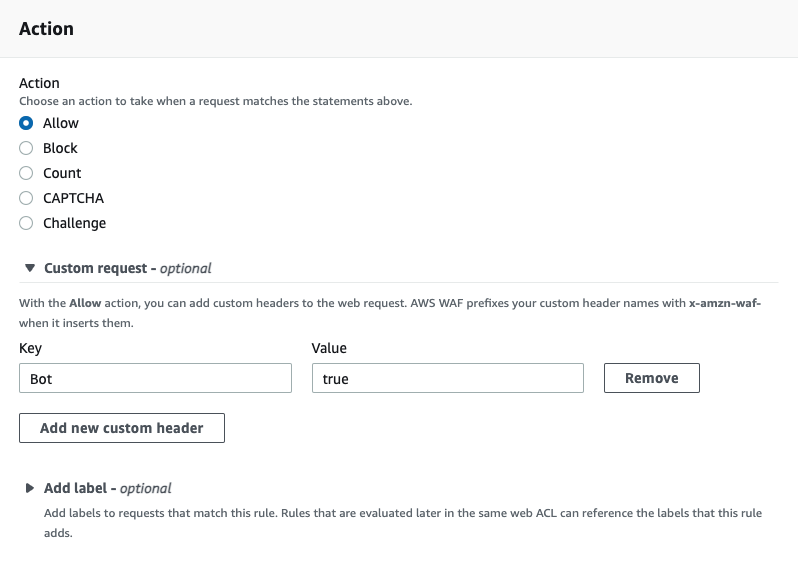
This will detect the top known AI bots. Next, for the action, be sure to choose "Allow" and to add a custom header. Ours is called bot, but feel free to make this anything unique.
Next, navigate to the CloudFront product and to the "Functions" tab. Create a new function and paste in the following javascript:
function handler(event) {
  if (event.request.headers['x-amzn-waf-bot'] !== undefined) {
    const host = event.request.headers.host.value
    const uri = event.request.uri
    const newurl = `https://tollbit.${host}${uri}`
    const response = {
      statusCode: 302,
      statusDescription: 'Found',
      headers: { location: { value: newurl } },
    }
    return response
  }
  return event.request
}
Earlier, our WAF rule had set a header called bot onto the request if it matched the rule. Amazon automatically appends x-amzn-waf- to the header, so the actual header to look for is now called x-amzn-waf-bot. If this header exists, it means that our WAF rule detected that this request
is a bot request, so we now want to forward it to our tollbit subdomain. Once you are ready, save the changes and publish this code. On the publish tab, you will then need to associate this function to your existing CloudFront distribution.
NoteThis code snippet will run for every request to your distribution. Please
ensure you've tested this function before completing this step.
Updated 3 months ago