
CloudFlare
Learn how to integrate TollBit with CloudFlare.
We provide a way for all CloudFlare customers to forward HTTP logs to our platform to enable Analytics and to set up bot rewrites to enable Agent Site.
The right setup depends on your CloudFlare plan, because it determines how you can forward logs:
- Enterprise plan: you have access to LogPush, which records every request at the zone level. Analytics comes from LogPush, and Agent Site is handled by a lightweight Snippet. No Worker is required.
- Free, Pro or Business plan: you do not have LogPush, so analytics is forwarded by a Worker. Because a Snippet would run before that Worker and hide bot traffic from your logs (see the note under Snippets), these plans use a single combined Worker that forwards logs and routes bots together.
Find your plan below and follow that section. If you only want Agent Site and are not using TollBit Analytics, either path's Agent Site steps will work on their own.
Allow TollBit's IP Addresses
RequiredTollBit must be able to reach your sites. We request your pages to set up your Agent Site. If our requests are blocked, challenged, or rate-limited, your Agent Site will not work correctly.
TollBit sends these requests from a fixed set of static IP addresses, published at https://tollbit.com/static-ips.txt. At the time of writing, the list is:
52.22.183.94
3.220.109.109
Always use the published list as the source of truth, and check it again if TollBit tells you it has changed.
Our requests use the user agent tollbot/1.0, so you may see it show up in your logs.
Allow these addresses in Cloudflare, and make sure they are allowed through every security layer that could block or challenge our requests. This applies to every hostname you onboard with us:
- WAF: custom rules, managed rules, rate limiting rules, and your Security Level.
- Bot protection, if enabled: make sure requests from these IPs are not blocked or challenged by Bot Fight Mode, Super Bot Fight Mode, or Bot Management.
- Any firewall or WAF in front of your origin servers, outside of Cloudflare.
If you are unsure whether your configuration blocks us, contact [email protected] and we will confirm from our side.
Pre-Requisites
Regardless of plan, before setting up TollBit you'll need to set up SSL / TLS encryption mode.
Setting up SSL / TLS
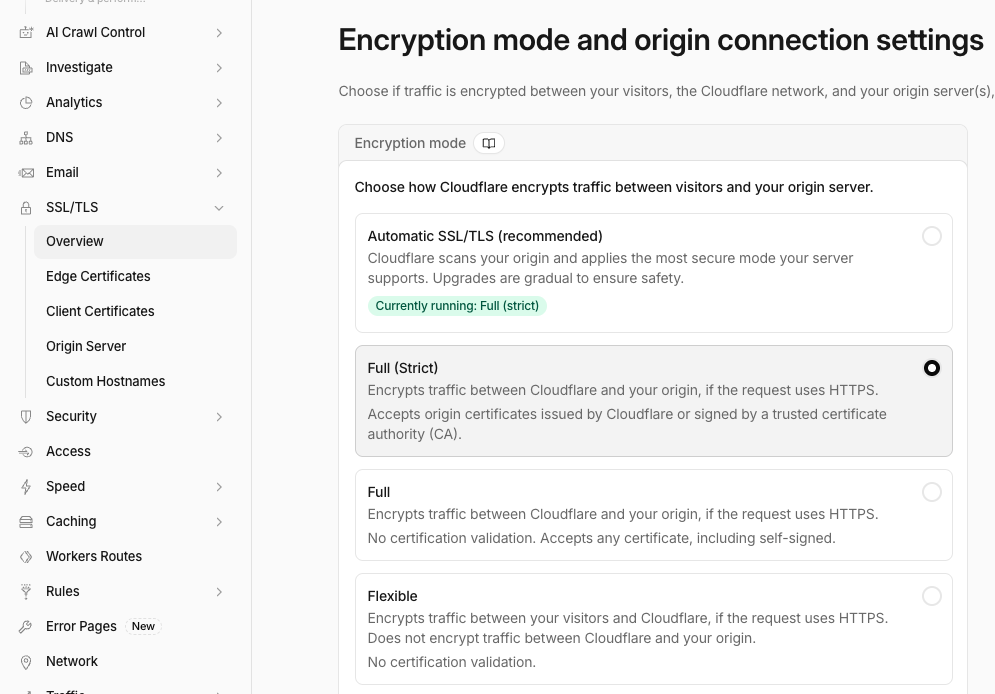
Navigate to the SSL/TSL tab on the left and go into the over page, and click configure. You want to ensure that you choose Full(Strict) here. This will ensure that Cloudflare fetches data over HTTPS instead of HTTP.
Before doing this, ensure that your origin server accepts HTTPS requests; most should unless you are running custom or legacy servers.
The code snippets here are for a clean CloudFlare environment. If you have existing snippets or workers that are processing requests from your domain, you will need to integrate these scripts into your existing environment.
Enterprise Plan
On the Enterprise plan, analytics is forwarded via LogPush and Agent Site is handled by a Snippet. Because LogPush records every request at the zone level — including requests the Snippet proxies to your tollbit subdomain — the Snippet and LogPush together give you complete analytics with no Worker and no per-request Worker cost.
Steps for Analytics
On the Enterprise plan, you should have access to CloudFlare's Logpush feature. You may already be pushing logs to an S3, R2 or GCP bucket. If this is the case, we are able to ingest your logs from where they are already being stored.
One small update you may need to make is adding the location response header and the signature-agent, signature-input and signature request headers to the logs. Follow these steps in Cloudflare's documentation to add this header. You will want to select "Response Header" as the field type and type in location, and select "Request Header" and type in signature-agent, signature-input and signature.
If your logs are already being sent to an S3 bucket, add the following IAM policy to your bucket to enable TollBit to process your logs:
{
  "Version": "2012-10-17",
  "Statement": [
    {
      "Sid": "AllowTollbitAccountsAccess",
      "Effect": "Allow",
      "Principal": {
        "AWS": [
          "arn:aws:iam::339712821696:root",
          "arn:aws:iam::654654318267:root"
        ]
      },
      "Action": ["s3:GetObject*", "s3:ListBucket*"],
      "Resource": [
        "arn:aws:s3:::YOUR-BUCKET-NAME",
        "arn:aws:s3:::YOUR-BUCKET-NAME/*"
      ]
    }
  ]
}
Once you have done that, reach out to [email protected] and provide the path to your logs in your bucket and we will be able to quickly enable TollBit analytics for your site.
Steps for Agent Site
Make sure you've completed the SSL / TLS prerequisite above first.
For customers that want to set up a simple rewrite without the overhead of setting up workers, Snippets are a quick and cost effective way to set up a rewrite following simple rules. Because your analytics comes from LogPush rather than a Worker, the Snippet is all you need for Agent Site.
Snippets and the Log Forwarding Worker Do Not MixSnippets execute earlier in Cloudflare's traffic sequence than Worker routes. When a Snippet matches a bot and proxies the request, it returns the response itself and any Worker route never runs for that request. This is fine on Enterprise because LogPush records the request at the zone level regardless. But it means the Snippet must not be combined with the log forwarding Worker used on the Free, Pro and Business plans — if it were, bot traffic would silently never appear in your logs. On Enterprise, use the Snippet with LogPush and do not deploy a logging Worker.
First, in the left nav when you're within the view for one of your websites, find the Rules tab and click the dropdown, and then click into the Snippets section.
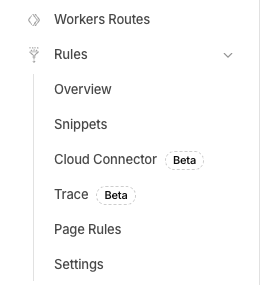
Once you're on the snippets page, click the Create Snippet button. This will take you to an editor similar to a CF Workers editor. Name this file something along the lines of rewrite_to_tollbit. You can paste in the following code, making modifications to the bot list as you find appropriate for your goals.
const botList = [
 'Amazonbot', 'Amzn-SearchBot', 'anthropic-ai', 'Bytespider', 'CCBot',
 'ChatGPT-User', 'claude-code', 'Claude-SearchBot', 'Claude-User',
 'Claude-Web', 'ClaudeBot', 'cohere-ai', 'Diffbot', 'DuckAssistBot',  'ExaBot', 'Exabot',
 'GPTBot', 'meta-externalagent', 'Meta-Webindexer', 'Mistral-AI', 'OAI-AdsBot',
 'OAI-SearchBot', 'Perplexity-User', 'PerplexityBot', 'ShapBot', 'Shap-User', 'Timpibot', 'YouBot'
];


export default {
 async fetch(request) {
   const userAgent = request.headers.get('User-Agent') || '';
   let host = request.headers.get('host') || '';


   if (host.startsWith('www.')) {
     host = host.slice(4);
   }


   const isBot = botList.some(b => userAgent.toLowerCase().includes(b.toLowerCase()));


   if (isBot) {
     const path = request.url.replace('https://' + request.headers.get('host'), '');
     const tollbitUrl = 'https://tollbit.' + host + path;


     // Safe body extraction to prevent runtime errors on GET/HEAD inside Snippets
     const hasBody = ['POST', 'PUT', 'PATCH'].includes(request.method);


     const proxiedResponse = await fetch(new Request(tollbitUrl, {
       method: request.method,
       headers: request.headers,
       body: hasBody ? request.body : null,
       redirect: 'manual'
     }));


     const responseHeaders = new Headers(proxiedResponse.headers);
     responseHeaders.set('Cache-Control', 'no-store');


     return new Response(proxiedResponse.body, {
       status: proxiedResponse.status,
       statusText: proxiedResponse.statusText,
       headers: responseHeaders
     });
   }


   // Let non-bot requests pass through to your regular origin
   return fetch(request);
 },
};
Before saving and deploying this Snippet, click on the "Snippet rule" button on the upper right and select "All incoming requests".
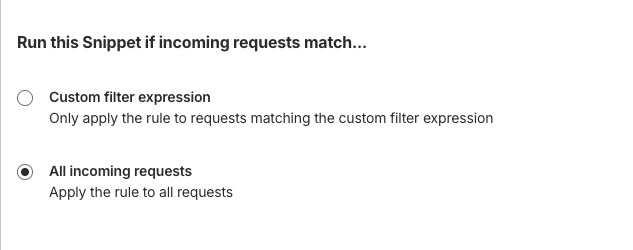
Now, you should be able to click Deploy, and this Snippet will immediately begin rewriting requests with these user agents to your tollbit subdomain.
NoteThis Snippet will intercept and rewrite traffic requests from your site to your
tollbitsubdomain. It is crucial to make sure that you are certain of this change and QA it thoroughly to ensure that it is not blocking human traffic or good bot traffic (Google, etc) before elevating it across your entire website.The ordering of snippets matter if you have multiple snippets. They will evaluate in the order they are listed in the dashboard.
Bot Management
If you are using Cloudflare Bot Management, you also have access to the bot score on each request. You can widen the Snippet's detection to catch bots beyond the user agent list by also checking the bot score. Replace the isBot line in the Snippet above with the following, and set BOT_SCORE_THRESHOLD to determine how strict your rewrite is. CloudFlare lists what each score range means.
const BOT_SCORE_THRESHOLD = 30;
const botScore = request.cf?.botManagement?.score;
const isBot =
  botList.some(b => userAgent.toLowerCase().includes(b.toLowerCase())) ||
  (botScore !== undefined && botScore < BOT_SCORE_THRESHOLD);
Free, Pro and Business Plans
On these plans there is no LogPush, so analytics is forwarded by a Worker. Snippets are not used on these plans: a Snippet runs before your Worker route and would proxy bot requests before the logging Worker ever sees them, silently dropping all bot traffic from your analytics. Instead, a single combined Worker forwards logs and routes bots together, so every request is logged with the status actually served.
Steps for Analytics
Create new Worker
You must be proxying traffic through CloudFlare in order have the worker seconds your logs over to us. Most websites are already doing this, but if you are not certain, you can check by going into your site's DNS page and ensuring that your main site's DNS settings have proxy status as
Proxied.

If you already have an existing worker that is intercepting requests for your site, or you plan to also set up Agent Site below, you will need to integrate this logging code with that worker. If you want both analytics and Agent Site, skip ahead to the combined Worker in the Agent Site section, which does both in one script.
Log into your CloudFlare Dashboard and click on the "Compute (Workers)" tab to have it open as a dropdown, and click on "Workers & Pages".
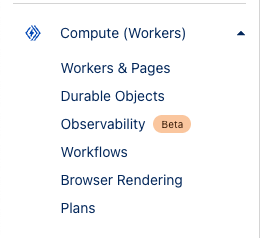
Click on the blue "Create" button near the top.
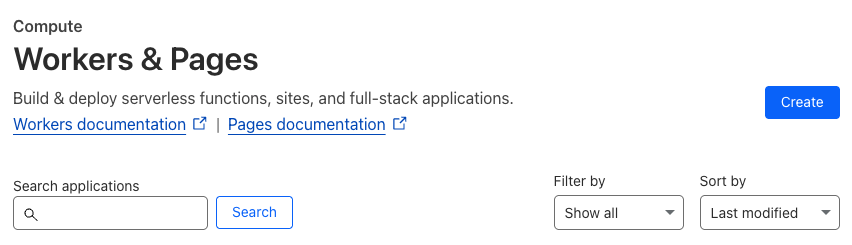
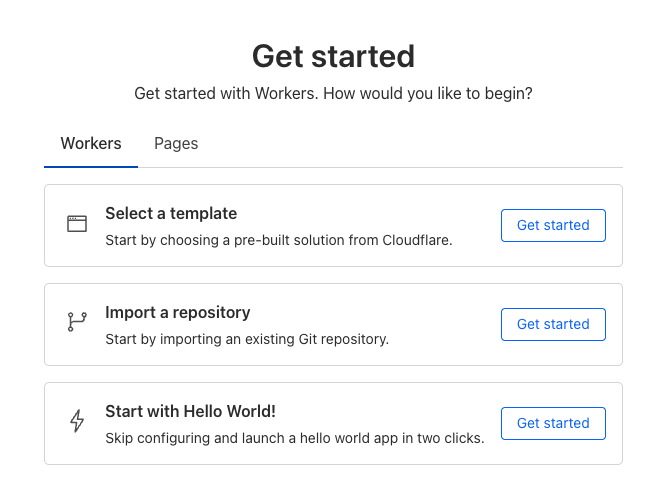
This will take you to a get started screen. Choose the option to create a hello world worker, as we were be overwriting all the worker code in the next few steps anyways.
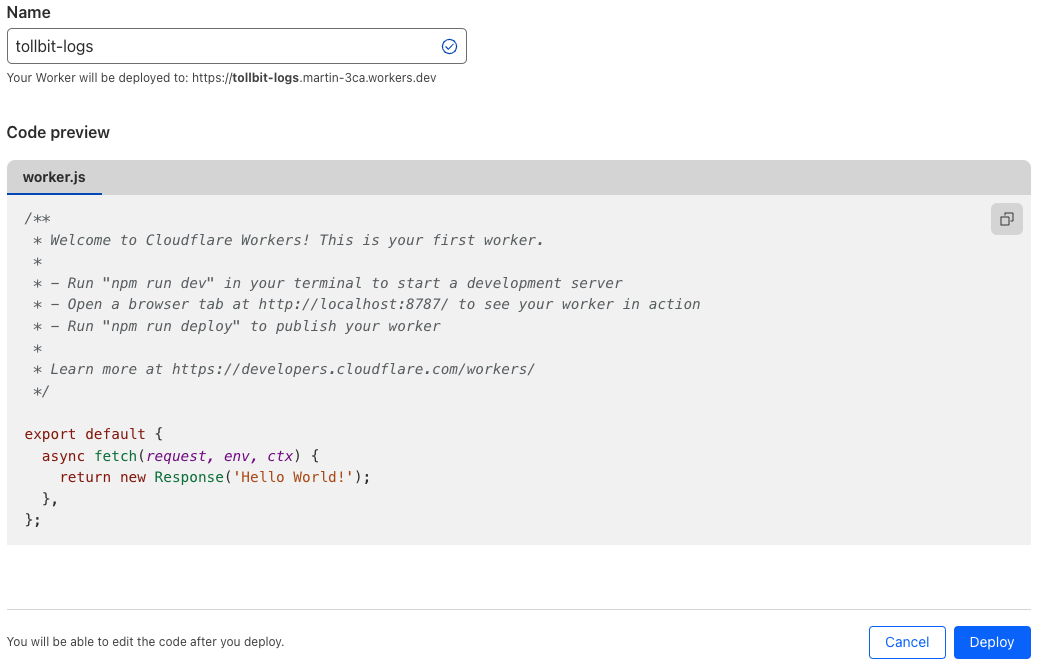
Next will be a screen where you can name your worker and see the initial code that it will be running. Set the name to something TollBit related such as tollbit-worker, and click deploy. We will be modifying the worker code shortly.
Updating the Worker Code
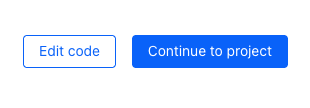
Once your worker has finished deploying, click "Edit code".
In the worker.js file, delete everything and copy the following code over exactly, making sure to replace YOUR_SECRET_KEY_HERE with the secret key you can find in your portal.
Setting up Agent Site too?If you plan to set up Agent Site as well, skip this log-only Worker and use the combined Worker in the Agent Site section below, which forwards logs and routes bots in a single script. Deploying this log-only Worker and then a separate bot Worker on the same route does not work — CloudFlare only runs one Worker per route.
const CF_APP_VERSION = '1.0.0'

const tollbitLogEndpoint = 'https://log.tollbit.com/log'
const tollbitToken = 'YOUR_SECRET_KEY_HERE'

const sleep = (ms) => {
  return new Promise((resolve) => {
    setTimeout(resolve, ms)
  })
}

const makeid = (length) => {
  let text = ''
  const possible = 'ABCDEFGHIJKLMNPQRSTUVWXYZ0123456789'
  for (let i = 0; i < length; i += 1) {
    text += possible.charAt(Math.floor(Math.random() * possible.length))
  }
  return text
}

const buildLogMessage = (request, response) => {
  const logObject = {
    timestamp: new Date().toISOString(),
    ip_address: request.headers.get('cf-connecting-ip'),
    geo_country: request.cf['country'],
    geo_city: request.cf['city'],
    geo_postal_code: request.cf['postalCode'],
    geo_latitude: request.cf['latitude'],
    geo_longitude: request.cf['longitude'],
    host: request.headers.get('host'),
    url: request.url.replace('https://' + request.headers.get('host'), ''),
    request_method: request.method,
    request_protocol: request.cf['httpProtocol'],
    request_user_agent: request.headers.get('user-agent'),
    request_latency: null, // cloudflare does not have latency information
    request_referer: request.headers.get('referer'),
    response_state: null,
    response_status: response.status,
    response_reason: response.statusText,
    response_body_size: response.contentLength,
    signature: request.headers.get('signature'),
    signature_agent: request.headers.get('signature-agent'),
    signature_input: request.headers.get('signature-input'),
  }
  return logObject
}

// Batching
const BATCH_INTERVAL_MS = 20000 // 20 seconds
const MAX_REQUESTS_PER_BATCH = 500 // 500 logs
const WORKER_ID = makeid(6)

let workerTimestamp

let batchTimeoutReached = true
let logEventsBatch = []

// Backoff
const BACKOFF_INTERVAL = 10000
let backoff = 0

async function addToBatch(body, event) {
  logEventsBatch.push(body)

  if (logEventsBatch.length >= MAX_REQUESTS_PER_BATCH) {
    event.waitUntil(postBatch(event))
  }

  return true
}

async function handleRequest(event) {
  const { request } = event

  const response = await fetch(request)
  const rCf = request.cf
  delete rCf.tlsClientAuth
  delete rCf.tlsExportedAuthenticator

  const eventBody = buildLogMessage(request, response)
  event.waitUntil(addToBatch(eventBody, event))

  return response
}

const fetchAndSetBackOff = async (lfRequest, event) => {
  if (backoff <= Date.now()) {
    const resp = await fetch(tollbitLogEndpoint, lfRequest)
    if (resp.status === 403 || resp.status === 429) {
      backoff = Date.now() + BACKOFF_INTERVAL
    }
  }

  event.waitUntil(scheduleBatch(event))

  return true
}

const postBatch = async (event) => {
  const batchInFlight = [...logEventsBatch.map((e) => JSON.stringify(e))]
  logEventsBatch = []
  const body = batchInFlight.join('\n')
  const request = {
    method: 'POST',
    headers: {
      TollbitKey: `${tollbitToken}`,
      'Content-Type': 'application/json',
    },
    body,
  }
  event.waitUntil(fetchAndSetBackOff(request, event))
}

const scheduleBatch = async (event) => {
  if (batchTimeoutReached) {
    batchTimeoutReached = false
    await sleep(BATCH_INTERVAL_MS)
    if (logEventsBatch.length > 0) {
      event.waitUntil(postBatch(event))
    }
    batchTimeoutReached = true
  }
  return true
}

addEventListener('fetch', (event) => {
  event.passThroughOnException()

  if (!workerTimestamp) {
    workerTimestamp = new Date().toISOString()
  }

  event.waitUntil(scheduleBatch(event))
  event.respondWith(handleRequest(event))
})
Hit "Deploy" on the upper righthand corner once you are finished, and then navigate out of the editor with the little back arrow on the upper left side of the page, next to the name of the worker.
Link worker to CloudFlare HTTP Logs
Click on "Account Home" on the left pane and select the website that you would like to forward logs for, and click into it. On the left panel, click into "Worker Routes", and then click "Add route". Set the route to *.<your_site.com>/*, or a custom path if you only want to forward logs for certain URL patterns. Under workers, choose the worker that you just created.
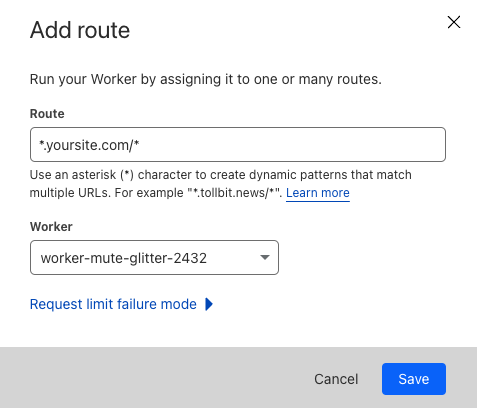
Once you are ready, click "Save", and you are all set!
If your main site does not use the
wwwsubdomain and all traffic towwwgets redirected to your main site (www.example.comgets redirected toexample.com), you will need to set your worker route to just<your_site.com>/*.
Minimizing Worker Usage
By default, the above configuration will have every request to your site run through your worker. To reduce the number of requests for workers, we must keep in mind that our analytics platform works best if we try to send logs that correspond to page views, and avoid sending logs that are for requests for static assets or javascript files.
To successfully minimize worker usage, investigate your directory structure and see if you have a common paths for static assets. For example, some CMS frameworks will have a directory similar to example.com/assets for assets. To avoid running the worker on these request paths, create a new route for your worker for that path, in this example *.example.com/assets* and example.com/assets*, and set the worker for that route to be "Empty".
Your route page will then look something like the following.
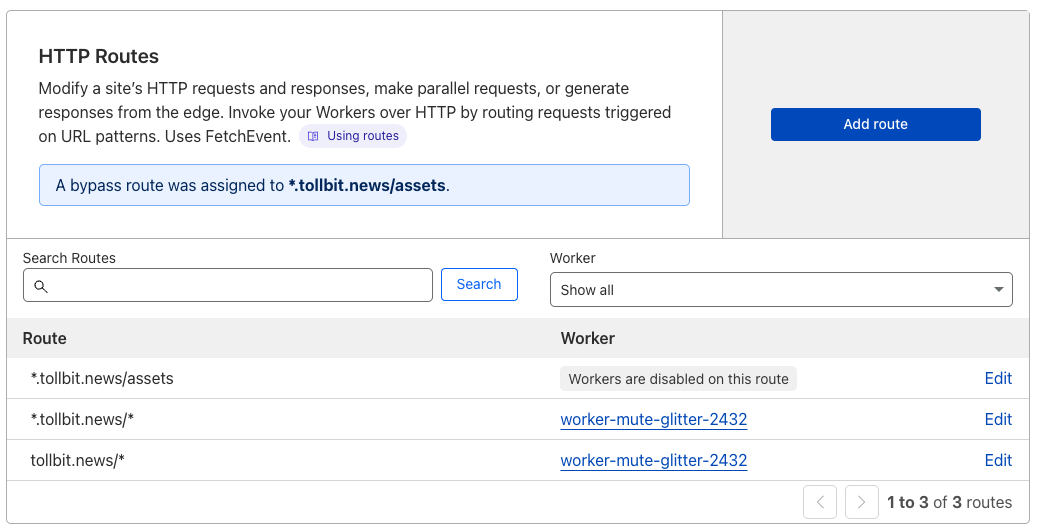
If you aren't sure which route to disable, consider running the worker on your full site and then using the top pages chart in our analytics platform to understand any routes you wish to filter out.
Steps for Agent Site
Make sure you've completed the SSL / TLS prerequisite above first.
On these plans, Agent Site runs in a Worker. Which script you deploy depends on whether you also want TollBit Analytics.
One Worker Per RouteCloudFlare only runs one Worker per route. If you already created the log forwarding Worker above, do not create a second Worker for bots — replace that Worker's code with the combined script below, keeping your TollBit token. Two Workers on the same route will result in only one receiving requests.
If you want both Analytics and Agent Site, use this combined Worker. It forwards logs and routes bots in a single script, so bot traffic is logged with the status actually served. Replace your worker.js with this code, keeping your TollBit token (line 33).
// this is a non-exhaustive list of agents that we recommend you get started with first
// Add any other agents you would like to forward into this list.
const botList = [
 'Amazonbot', 'Amzn-SearchBot', 'anthropic-ai', 'Bytespider', 'CCBot',
 'ChatGPT-User', 'claude-code', 'Claude-SearchBot', 'Claude-User',
 'Claude-Web', 'ClaudeBot', 'cohere-ai', 'Diffbot', 'DuckAssistBot',  'ExaBot', 'Exabot','GPTBot', 'meta-externalagent', 'Meta-Webindexer', 'Mistral-AI', 'OAI-AdsBot','OAI-SearchBot', 'Perplexity-User', 'PerplexityBot', 'ShapBot', 'Shap-User', 'Timpibot', 'YouBot'
];

const CF_APP_VERSION = '1.0.0'

const tollbitLogEndpoint = 'https://log.tollbit.com/log'
const tollbitToken = 'YOUR_SECRET_KEY_HERE'

const sleep = (ms) => {
  return new Promise((resolve) => {
    setTimeout(resolve, ms)
  })
}

const makeid = (length) => {
  let text = ''
  const possible = 'ABCDEFGHIJKLMNPQRSTUVWXYZ0123456789'
  for (let i = 0; i < length; i += 1) {
    text += possible.charAt(Math.floor(Math.random() * possible.length))
  }
  return text
}

const buildLogMessage = (request, response) => {
  const logObject = {
    timestamp: new Date().toISOString(),
    ip_address: request.headers.get('cf-connecting-ip'),
    geo_country: request.cf['country'],
    geo_city: request.cf['city'],
    geo_postal_code: request.cf['postalCode'],
    geo_latitude: request.cf['latitude'],
    geo_longitude: request.cf['longitude'],
    host: request.headers.get('host'),
    url: request.url.replace('https://' + request.headers.get('host'), ''),
    request_method: request.method,
    request_protocol: request.cf['httpProtocol'],
    request_user_agent: request.headers.get('user-agent'),
    request_latency: null, // cloudflare does not have latency information
    request_referer: request.headers.get('referer'),
    response_state: null,
    response_status: response.status,
    response_reason: response.statusText,
    response_body_size: response.contentLength,
    signature: request.headers.get('signature'),
    signature_agent: request.headers.get('signature-agent'),
    signature_input: request.headers.get('signature-input'),
  }
  return logObject
}

// Batching
const BATCH_INTERVAL_MS = 20000 // 30 seconds
const MAX_REQUESTS_PER_BATCH = 500 // 500 logs
const WORKER_ID = makeid(6)

let workerTimestamp

let batchTimeoutReached = true
let logEventsBatch = []

// Backoff
const BACKOFF_INTERVAL = 10000
let backoff = 0

async function addToBatch(body, event) {
  logEventsBatch.push(body)

  if (logEventsBatch.length >= MAX_REQUESTS_PER_BATCH) {
    event.waitUntil(postBatch(event))
  }

  return true
}

async function handleRequest(event) {
    const { request } = event
    const isBotRequest = checkIfBotRequest(request)

    if (isBotRequest) {
      const path = request.url.replace('https://' + request.headers.get('host'), '')
      let host = request.headers.get('host') || ''
      if (host.startsWith('www.')) {
        host = host.slice(4)
      }
      const tollbitUrl = 'https://tollbit.' + host + path

      const proxiedResponse = await fetch(new Request(tollbitUrl, {
        method: request.method,
        headers: request.headers,
        body: request.body,
        redirect: 'manual'
      }))

      const responseHeaders = new Headers(proxiedResponse.headers)
      responseHeaders.set('Cache-Control', 'no-store')

      const response = new Response(proxiedResponse.body, {
        status: proxiedResponse.status,
        statusText: proxiedResponse.statusText,
        headers: responseHeaders
      })

      const logObject = buildLogMessage(request, response)
      event.waitUntil(addToBatch(logObject, event))

      return response
    } else {
      const response = await fetch(request)
      const eventBody = buildLogMessage(request, response)
      event.waitUntil(addToBatch(eventBody, event))
      return response
    }
  }


const fetchAndSetBackOff = async (lfRequest, event) => {
  if (backoff <= Date.now()) {
    const resp = await fetch(tollbitLogEndpoint, lfRequest)
    if (resp.status === 403 || resp.status === 429) {
      backoff = Date.now() + BACKOFF_INTERVAL
    }
  }

  event.waitUntil(scheduleBatch(event))

  return true
}

const postBatch = async (event) => {
  const batchInFlight = [...logEventsBatch.map((e) => JSON.stringify(e))]
  logEventsBatch = []
  const body = batchInFlight.join('\n')
  const request = {
    method: 'POST',
    headers: {
      TollbitKey: `${tollbitToken}`,
      'Content-Type': 'application/json',
    },
    body,
  }
  event.waitUntil(fetchAndSetBackOff(request, event))
}

const scheduleBatch = async (event) => {
  if (batchTimeoutReached) {
    batchTimeoutReached = false
    await sleep(BATCH_INTERVAL_MS)
    if (logEventsBatch.length > 0) {
      event.waitUntil(postBatch(event))
    }
    batchTimeoutReached = true
  }
  return true
}

const checkIfBotRequest = (request) => {
  const userAgent = request.headers.get('User-Agent') || ''

  for (var i = 0; i < botList.length; i++) {
    if (userAgent.toLowerCase().includes(botList[i].toLowerCase())) {
      return true
    }
  }
  return false
}

addEventListener('fetch', (event) => {
  event.passThroughOnException()

  if (!workerTimestamp) {
    workerTimestamp = new Date().toISOString()
  }

  event.waitUntil(scheduleBatch(event))
  event.respondWith(handleRequest(event))
})
This code will immediately let through anyone with a known browser, and check all other requests against a list that we will periodically update with known bad user agents.
If you only want to forward bot traffic and are not using TollBit Analytics, put the following simpler code in your worker.js file instead.
// this is a non-exhaustive list of agents that we recommend you get started with first
// Add any other agents you would like to forward into this list.
const botList = [
  'Amazonbot',
  'Amzn-SearchBot',
  'anthropic-ai',
  'Bytespider',
  'CCBot',
  'ChatGPT-User',
  'claude-code',
  'Claude-SearchBot',
  'Claude-User',
  'Claude-Web',
  'ClaudeBot',
  'cohere-ai',
  'Diffbot',
  'ExaBot',
  'Exabot',
  'GPTBot',
  'meta-externalagent',
  'Meta-Webindexer',
  'OAI-AdsBot',
  'OAI-SearchBot',
  'Perplexity-User',
  'PerplexityBot',
  'ShapBot',
  'Shap-User',
  'Timpibot',
  'YouBot'
  ]

  export default {
    async fetch(request) {
      const userAgent = request.headers.get('User-Agent') || ''
      let host = request.headers.get('host') || ''
      if (host.startsWith('www.')) {
        host = host.slice(4)
      }

      const isBot = botList.some(b => userAgent.toLowerCase().includes(b.toLowerCase()))

      if (isBot) {
        const path = request.url.replace('https://' + request.headers.get('host'), '')
        const tollbitUrl = 'https://tollbit.' + host + path

        const proxiedResponse = await fetch(new Request(tollbitUrl, {
          method: request.method,
          headers: request.headers,
          body: request.body,
          redirect: 'manual'
        }))

        const responseHeaders = new Headers(proxiedResponse.headers)
        responseHeaders.set('Cache-Control', 'no-store')

        return new Response(proxiedResponse.body, {
          status: proxiedResponse.status,
          statusText: proxiedResponse.statusText,
          headers: responseHeaders
        })
      }

      return fetch(request)
    },
  }
Once the worker is saved, click Activate and you should be all set.
This Worker will intercept and potentially rewrite traffic from your site to your
tollbitsubdomain. It is crucial to make sure that you are certain of this change and QA it thoroughly to ensure that it is not blocking human traffic or good bot traffic (Google, etc) before elevating it across your entire website.
Updated 4 days ago