
General Route
Learn how to integrate TollBit Analytics and Agent Site without a listed integration.
Allow TollBit's IP Addresses
RequiredTollBit must be able to reach your sites. We request your pages to set up your Agent Site. If our requests are blocked, challenged, or rate-limited, your Agent Site will not work correctly.
TollBit sends these requests from a fixed set of static IP addresses, published at https://tollbit.com/static-ips.txt. At the time of writing, the list is:
52.22.183.94
3.220.109.109
Always use the published list as the source of truth, and check it again if TollBit tells you it has changed.
Our requests use the user agent tollbot/1.0, so you may see it show up in your logs.
Make sure these addresses are allowed through every security layer that could block or challenge our requests. This applies to every hostname you onboard with us:
- Your CDN's WAF and firewall rules: IP allow and block lists, managed rules, and rate limiting.
- Bot protection, if enabled: make sure requests from these IPs are not blocked, challenged, or served alternate content.
- Any firewall or WAF in front of your origin servers, outside of your CDN.
If you are unsure whether your configuration blocks us, contact [email protected] and we will confirm from our side.
Analytics
You can enable TollBit analytics as long as you have HTTP traffic logs being proxied on your site. We allow customers to send these traffic logs either via a cloud storage bucket option (S3, GCS, Azure, R2) or via the cloud sink API.
Ingesting from file storage
We are currently able to support log ingestion from S3, R2 and GCS. Please ensure that your log files are prefixed by date and time, and that the logs within the files are in JSON format (ideally as similar to the above as possible), and each log is a single line and all logs are newline separated.
If you are already forwarding logs to an S3 bucket, you can get a head start on the setup by creating the following IAM policy for your bucket: If your logs are already being sent to an S3 bucket, add the following IAM policy to your bucket to enable TollBit to process your logs:
{
  "Version": "2012-10-17",
  "Statement": [
    {
      "Sid": "AllowTollbitAccountsAccess",
      "Effect": "Allow",
      "Principal": {
        "AWS": [
          "arn:aws:iam::339712821696:root",
          "arn:aws:iam::654654318267:root"
        ]
      },
      "Action": ["s3:GetObject*", "s3:ListBucket*"],
      "Resource": [
        "arn:aws:s3:::YOUR-BUCKET-NAME",
        "arn:aws:s3:::YOUR-BUCKET-NAME/*"
      ]
    }
  ]
}
S3 Buckets with ACLs (Access Control Lists)
The AWS recommendation is to disable ACLs and instead fully rely on IAM policies to control bucket access. However, there may be some legacy workflows that still requires ACLs, or at least some investigation into whether they can be safely disabled.
In case your AWS bucket has any Access Control Lists (ACLs) added, we recommend those. If you still wish to keep your bucket ACLs, we recommend first adding our canonical IDs to the bucket:
TollBit Canonical IDs:
f208f3b6492f906045d6e2fd71dbc6dc64247211c059ba3ae2eb712b949b8cdd
bbfe4f5f203ffb85e03d5d5325ab889271d6429b91a3766563bd0d08df2126ab
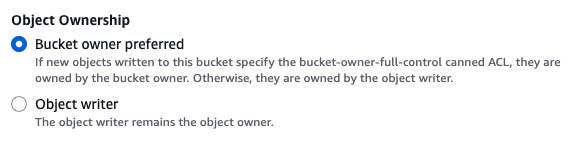
Please also update the object ownership permissions to "Bucket Owner Enforced". This should make your bucket the owner of objects written to it, which would allow us to read new objects written going forward, as they should respect your bucket's IAM policy.
Please contact [email protected] to complete the set up for you so you can
get access to TollBit Analytics.
Ingesting from Log Sink API
You can forward your logs to our log sink endpoint at https://log.tollbit.com/log as long as you include the header TollbitKey and set the value to your secret key in your dashboard. The logs must conform to the following JSON format.
Not all fields are required, but we need at least thetimestamp, host, url, request_user_agent, response_status, request_referer and request_method.
{
  timestamp: string, // can be ISO 8601 format or unix timestamp
  geo_country: string,
  geo_city: string,
  geo_postal_code: string,
  geo_latitude: float,
  geo_longitude: float,
  host: string,
  url: string,
  request_method: string,
  request_protocol: string,
  request_user_agent: string,
  request_latency: int/string,
  request_referer: string,
  response_state: string,
  response_status: int/string,
  response_reason: string,
  response_body_size: int/string,
  signature: string,
  signature_agent: string,
  signature_input: string,
  ip_address: string
}
When streaming the logs to the endpoint, please ensure that you are batching logs as much as possible. Each log be a single line, and should be newline separated from the other logs.
Agent Site
If your CDN or cybersecurity tool is not listed on our Integrations page, you can still route to the TollBit Agent Site as long as your platform supports bot redirect capabilities — the ability to detect bot user agents and redirect them to a custom URL.
How It Works
TollBit's Agent Site works by intercepting requests from AI crawlers and redirecting them to a TollBit-hosted URL, where access and monetization logic is handled. Any tool that can inspect the User-Agent header and conditionally redirect traffic can support this setup.
Prerequisites
Before configuring your tool, make sure you have:
- Your
tollbitsubdomain (e.g.,tollbit.yoursite.comorai.yoursite.com) — found in your TollBit dashboard - The list of bot user agents you want to monetize — available in your TollBit dashboard under Bot Management
- Access to your CDN or security tool's bot rules, firewall rules, or redirect configuration
General Setup Steps
Please see the following 4 steps below to integrate bot redirect at your edge layer to pass traffic to TollBit for monetization.
If you're unsure whether your platform supports bot redirect capabilities, or need help translating these steps to your specific tool, contact [email protected] or book a technical office hours session with our team.
Step 1 - Identify your redirect configuration
Log into your CDN or cybersecurity platform and locate where you can define custom rules based on request headers. This is typically found under:
- Firewall Rules or WAF Rules
- Bot Management
- Edge Rules or Request Manipulation
- Traffic Policies
Step 2 - Create a rule to match TollBit bot user agents
Create a new rule that triggers when the incoming User-Agent header matches any of the bots in your TollBit bot list. For example:
Recommend AI user agent list:
chatgpt-user, perplexitybot, gptbot, anthropic-ai, ccbot, claude-web, claudebot, claude-user, claude-searchbot, cohere-ai, youbot, diffbot, oai-searchbot, meta-externalagent, timpibot, amazonbot, bytespider, perplexity-user, shapbot, shap-user
Sample rule format:
User-Agent contains "ChatGPT-User" | User-Agent contains "GPTBot" | User-Agent contains "PerplexityBot" | User-Agent contains "anthropic-ai" | User-Agent contains "CCBot" | User-Agent contains "Claude-Web" | User-Agent contains "ClaudeBot" | User-Agent contains "Claude-User" | User-Agent contains "Claude-SearchBot" | User-Agent contains "cohere-ai" | User-Agent contains "YouBot" | User-Agent contains "Diffbot" | User-Agent contains "OAI-SearchBot" | User-Agent contains "meta-externalagent" | User-Agent contains "Timpibot" | User-Agent contains "Amazonbot" | User-Agent contains "Bytespider" | User-Agent contains "Perplexity-User" | User-Agent contains "ShapBot" | User-Agent contains "Shap-User"
Preserve the original request path when redirecting, so TollBit can serve the correct content:
https://your-tollbit-subdomain$request_uri
Step 3 - Set the redirect type
Use a 302 (temporary) redirect so that changes to your bot list or TollBit configuration take effect without caching issues.
Test your Configuration
Use a tool like curl to simulate a bot request and confirm the redirect is working:
curl -A "GPTBot" -I https://yoursite.com/sample-article
You should see a 302 response redirecting to your tollbit subdomain.
You can also use TollBit's in-product Test Bot Requests tab to further test each request and see the exact content that will be shown through the subdomain.
Tips
- Order of rules matters. Make sure the TollBit redirect rule runs before any other rules that might block or alter bot traffic.
- Allowlist TollBit's infrastructure. If your platform has aggressive bot blocking, ensure TollBit's own crawler (used for content indexing) is whitelisted. Check your TollBot section under Marketplace for more details.
- Keep your bot list in sync. As new AI crawlers emerge, update the user agents in both your TollBit dashboard and your CDN rule to ensure consistent coverage.
Updated 4 days ago